Hit the Road Dude, remade from one photo with a white pickup, private-property attitude and new English dialogue. Watch the real dog example, then sign in to create your own.
YOUR FACE. SAME ATTITUDE.PORTRAIT / DOG / CATONE PHOTO TO START
THE MEME STARTS WITH YOU
Create your meme video
Watch the real dog example, then choose one person, dog or cat photo. Sign in and review the credit pack before creating a remake with generated English dialogue. Your photo uploads when you start creation with enough credits.
01 / YOUR PHOTO → 02 / REVIEW → 03 / CREATE
12 seconds · 480p
AI-generated English dialogue · MP4
Sign-in and credit settings must be available before video creation.
Use a photo you own or have permission to use.
Video creation is unavailable right now. You can still choose a photo locally.
ONE PHOTO. A NEW MOMENT.
✓ One photo✓ Preview your result✓ Download MP4
THE MEME, EXPLAINED
What is the Hit the Road Dude meme?
“Hit the road” means leave. In this meme, a pickup driver tells fishing visitors to leave a spot he says is private property. His disbelief, repeated questions and firm goodbye turn a small disagreement into a reaction people can reuse.
State Property, Private Property and Lock ’Em Up refer to parts of the same exchange. AI remakes change the character while borrowing the recognizable setup. An AI version aims to put your person or pet in the driver’s place while keeping that familiar exchange recognizable.
Use one clear subject you own or have permission to use. The dog example shows a real result; portraits and cats are accepted inputs but still need separate result checks.
Portrait: the new neighbor
Choose a face that is large enough to recognize, with the eyes and mouth visible. A front or slight side view is a useful starting point. Keep distinctive hair and clothing in frame; avoid heavy blur, sunglasses that hide the eyes and crowded group photos.
Dog: the yard supervisor
Keep the muzzle, eyes, ears and recognizable coat markings visible. Use one dog in even light, with space around the head. A clear pet portrait gives a better reference than a distant action shot. Pet expressions and paw movement need their own result checks.
Cat: the couch landlord
Show the cat’s face and distinctive fur pattern without a toy or blanket covering the mouth. Pick a sharp image in natural light. Cropping can help separate the cat from a busy room, but do not cut away the ears or the features you want to keep recognizable.
RECOGNIZABLE BEFORE IT IS SHAREABLE
What makes an AI remake feel like the original?
A white truck alone does not make the joke. The real dog example shows the first-version approach. When reviewing a remake, look for these character, scene and performance qualities.
01
A recognizable character
You should recognize the person or pet from the input photo. Hair, clothing, coat color and facial markings matter; a random driver in similar clothes would miss the point.
02
The familiar pickup scene
The driver belongs at the white pickup’s open window, with the visitor outside the frame. Natural posture, believable hands or paws, and clean contact with the window keep the scene readable.
03
The pause and the send-off
The order of the exchange, disbelief, pause and final dismissal carry the reaction. Dialogue, the speaking character and mouth movement need to agree. Original audio, a new voice and lip sync are separate things to check.
YOUR PHOTO → YOUR MEME
How to make a Hit the Road Dude AI video
One photo, a 12-second remake and AI-generated English dialogue. Watch the real dog example, sign in and choose a credit pack before starting your video.
01
Choose one character
Select a JPG, PNG or WebP up to 10 MB. Choosing a photo first creates a local preview. Your photo uploads only after you start creation with enough credits.
02
Review the complete offer
Compare the video format, credit cost and one-time packs. If checkout is labelled Stripe TEST, use test payment details; it will not charge real money. Creating a video still uses paid AI processing.
03
Check the whole video
Play the complete result before sharing it. Review the character, pickup scene, dialogue and timing, then download the MP4. The dog video above is a real example, not the result from your selected photo.
BEFORE THE REMIXES
Where did Hit the Road Dude come from?
The source is a fishing-dispute video posted by @bird28thegr8 in August 2025. It features a white pickup, an argument about whether the spot is public or private, and the driver’s increasingly firm instructions to leave.
Lip-sync performances, green-screen edits and AI character remakes followed the original. Our dog sample is a newly generated remake with new audio. Open the source post for the original publisher, or follow the history link for a separate timeline.
12-second videos · 480p · 9:16 · 10 credits per video
Credit purchases are unavailable right now. You can still compare the packs below.
Single
1 video
10 credits
$4.99
RecommendedStarter
5 videos
50 credits
$19.99
Creator
15 videos
150 credits
$49.99
Pro
40 videos
400 credits
$99.99
Studio
100 videos
1000 credits
$199.00
Video delivery · Failed renders refunded in credits
FAQ
Questions about the meme and making your own
What's the meme with the guy in the white pickup truck?
You may be thinking of Hit the Road Dude, also known as the State Property, Private Property or Lock ’Em Up meme. A pickup driver argues with fishing visitors about a spot he says is private property, then tells them to leave.
Where can I watch the original Hit the Road Dude video?
Look for the original-post link in the ‘Where did Hit the Road Dude come from?’ section on this page. It leads to @bird28thegr8’s August 2025 TikTok post. The AI dog example is a separate remake, not the original footage.
What does ‘hit the road, dude’ mean?
Here it means ‘leave’ or ‘get out of here.’ The joke comes from the driver’s disbelief and firm dismissal during the property dispute. It should not be confused with a travel instruction or the song Hit the Road Jack.
What does he actually say in the meme?
Two recognizable short lines are ‘State? This? State?’ and ‘Hit the road, dude.’ Different edits use different parts of the exchange. Use the original-post link for the full conversation; this page does not offer a verified full transcript.
Does this put my face into the original video?
The first version generates a new pickup scene and new English audio from a photo and a prepared script. It does not edit the original footage or reuse its recording, and it does not promise an identical frame-by-frame performance.
How do I make my own Hit the Road Dude AI video?
Sign in, choose one clear photo, review the format and select a credit pack. After credits are available, click Create video to upload the photo and start generation. Checkout shows when Stripe is in TEST mode; test checkout does not charge real money, while video creation runs real AI processing.
Can I use a selfie and become the driver?
You can choose a portrait for this version. Use a clear photo with your eyes and mouth visible. Portraits have not yet been tested separately, so the dog example does not establish how a selfie will turn out.
Can I make my dog or cat say ‘Hit the road, dude’?
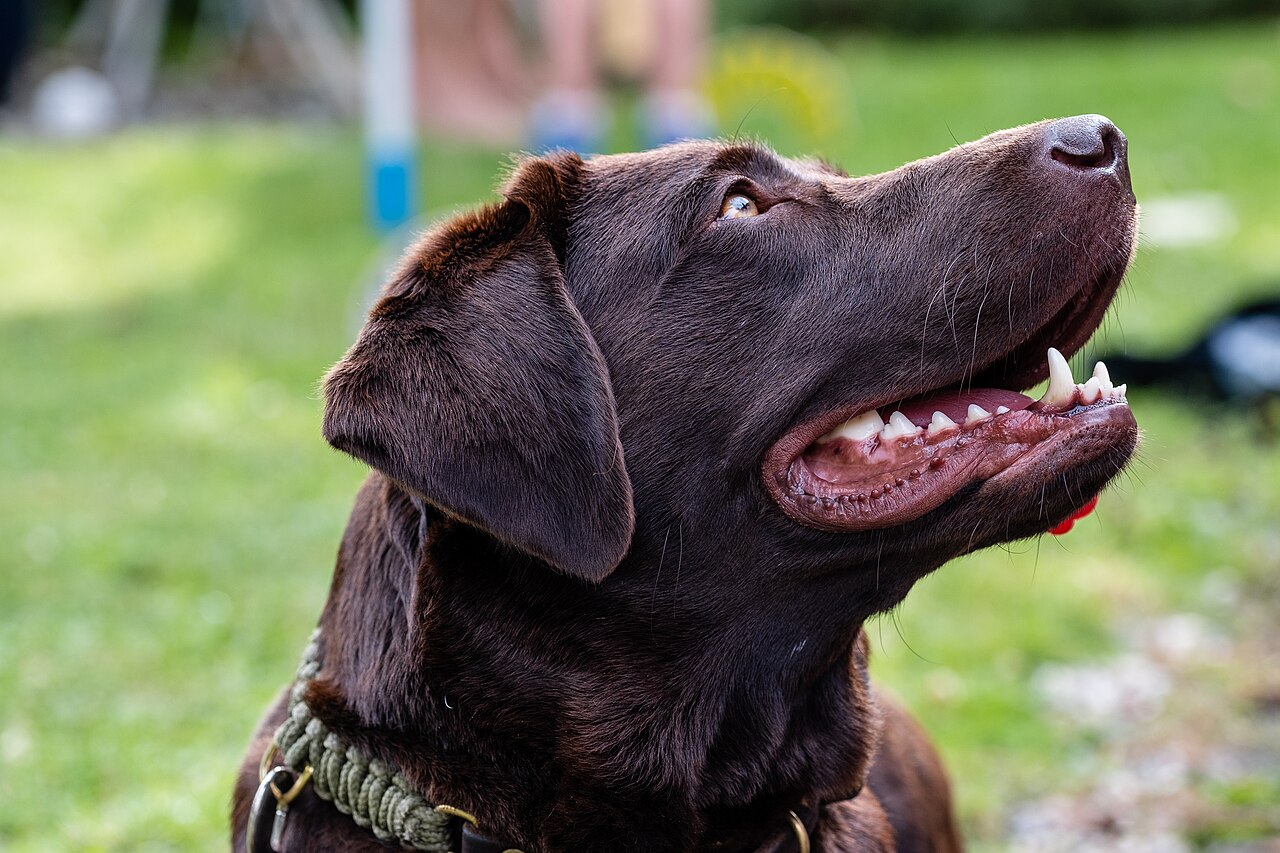
You can choose a dog or cat photo. The page shows a real AI-generated Labrador result with generated English audio. Cats still need a separate test, and one dog example cannot guarantee the result for every pet.
Is the dog example really AI-generated?
Yes. It was generated from the Labrador photo shown beside it, using new video and audio. The input photo is by Dktue under CC0, with its source linked below the example. Selecting your own photo does not change that sample.
Do I need a prompt, a reference video or an audio file?
You only need one suitable still photo. The first version uses a prepared pickup scene and dialogue script, so you do not need to write a prompt or upload the original video or a voice recording.
What kind of photo should I choose?
Use a sharp, evenly lit photo with one clearly visible face. Keep eyes, mouth, ears and distinctive hair or fur markings visible. Avoid heavy blur, face-covering objects and distant subjects; a clear portrait is a better starting point than a busy action shot.
Can I use a group photo or put two pets in the truck?
The first version is built around one photo of one main character. Choose a single person or pet, or crop a group photo to that subject. Multiple speaking characters and two-pet scenes are not part of the current format.
Which photo formats and file sizes work?
Choose a JPG, PNG or WebP image up to 10 MB. Other formats are not accepted by the photo picker. If your file is rejected, export it in one of those formats and check its size before choosing it again.
Does my photo need a truck or a cut-out background?
No. Start with a clear photo of the character; you do not need to photograph a pickup or remove the background first. The dog example began as a regular pet portrait. The generated scene can change the background and pose.
Will it use the original guy’s voice and sound?
The first version uses newly generated English voices and dialogue, not the original recording or a clone of its speaker. Turn on sound in the real dog example to hear this approach before deciding whether it matches what you want.
Can I change the words, choose a voice or use another language?
This version uses a prepared English scene and dialogue. It does not offer custom lines, selectable voices or other languages. The sample demonstrates the format, rather than a custom voice editor.
Will my face or my pet look exactly the same?
The goal is a recognizable character, but AI can change expressions, facial details, clothing or fur markings. Exact resemblance is not guaranteed. Review the full dog example and its input photo; portraits and cats still need their own checks.
Will the mouth movements match every word?
Mouth timing can vary. Play the full sample with sound to judge the speaking style and pauses. We do not promise word-perfect lip sync, identical gestures or the exact timing of the original performance.
How long is the video, and is it vertical?
The first version is a 12-second vertical video using the 480p option and a 9:16 target format. Actual dimensions can differ slightly: the dog example is 496 × 864 pixels and about 12.06 seconds long.
Can I download it and share it on TikTok, Reels or Shorts?
Successful personal videos can be played and downloaded as MP4 files for manual sharing to TikTok, Reels or Shorts. The current dog sample is also downloadable. The tool does not publish to your social accounts.
Can I make a video for free?
Watching the example and choosing a photo for local preview are free. Video creation uses credits, with no automatic free-video allowance. A Stripe TEST label means checkout does not charge real money; generating a video still uses paid AI processing.
How much does it cost, and which pack should I choose?
Compare the Pricing section for each one-time pack’s total price, credits and video count. All packs use the same video format, so choose by how many attempts you need; the recommended pack is optional. Check the Stripe TEST label before using test payment details.
Do I need an account or a subscription?
You can watch the example and preview a photo without an account. Creating a video and buying credits require sign-in. Packs are one-time purchases, with no recurring subscription in the current catalogue.
How long does it take to generate a video?
The 12 seconds describes the finished clip, not the time needed to create it. We do not guarantee a turnaround time. Follow your task status on the page; the sample is not a live timing estimate for your request.
What if my video fails, gets stuck or looks wrong?
A confirmed failed render returns credits. Pending submissions and file-delivery problems need review before another attempt; do not repeatedly submit the same job. A completed clip you dislike is a separate case, and there is no blanket cash-refund promise.
What happens to the photo I choose?
Choosing a photo first reads it locally in your browser. Starting creation with enough credits uploads it to private storage and makes it available to the video provider for that task. This version has no self-service photo deletion control; upload only images you are allowed to use.
Can I use someone else’s photo or make a video for an ad?
Use a photo you own or have permission to use. This tool does not provide a blanket commercial-use licence or permission to use another person’s likeness, the original footage or its recording. Check the applicable permissions before posting or using a clip in an ad.
Is this a CapCut template, or do I need to install an app?
This is a browser-based photo-to-video tool with a prepared scene, not a link that opens a CapCut template. You can watch the example, sign in and create a video here without installing an editing app.
Hit the Road Dude AI
Your property. Your rules.
Choose your character. Bring the attitude. Start with one photo.
 Hit the Road Dude AIONE PHOTO. YOUR PRIVATE PROPERTY.